
Updates & News
New: The Deal Calendar, Every Transaction on One Calendar
July 6, 2026 · Terry Peterson
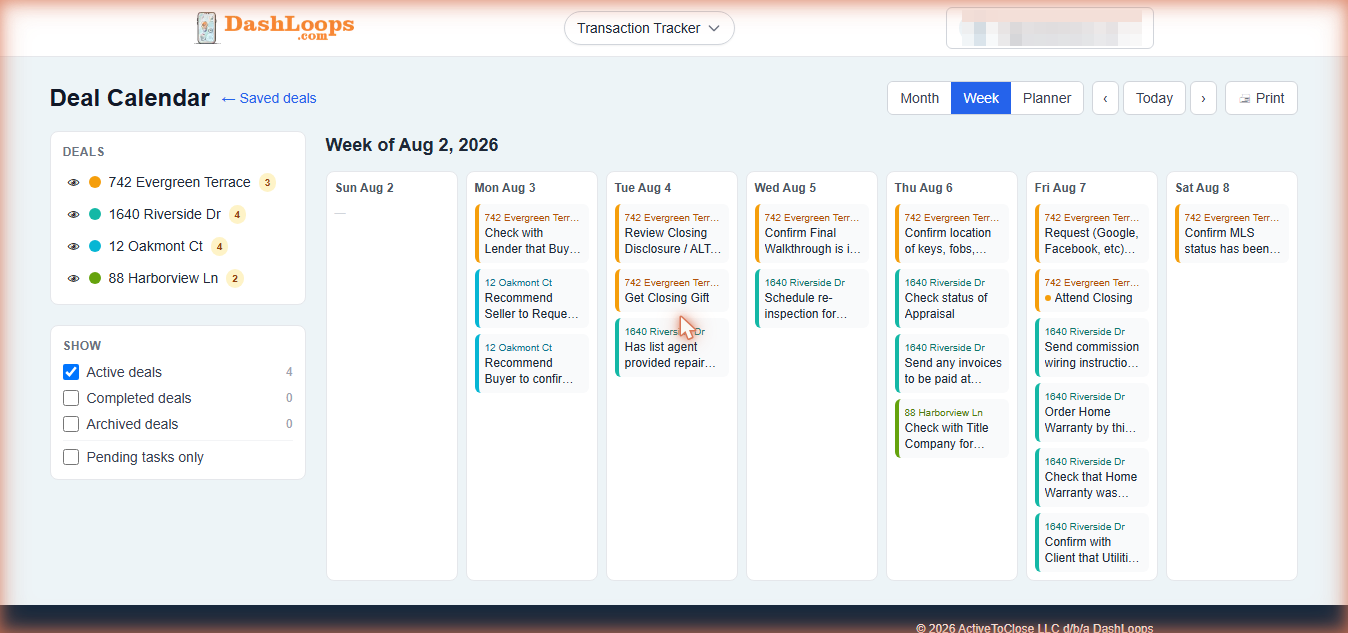
One tracker keeps one deal on schedule. The weeks that hurt are the ones where you're carrying three. The Transaction Tracker's biggest addition yet is the Deal Calendar: every saved deal's tasks, deadlines, and closings on one calendar, each deal in its own color.
What it does
- Month, Week, and Planner views. Planner is a day-by-day agenda, and it's what the calendar opens to on a phone.
- Work from the calendar directly. Check tasks off right on the calendar. It's the same data as the tracker, so a check-off in one place shows in the other, and changing a close date redraws every downstream deadline.
- Nothing unscheduled hides. A deal missing an anchor date, or an inspection without an appointment, gets a needs-scheduling flag you can fill in on the spot.
- Add dates to your own calendar. Every task has an Add to Google Calendar link, and each deal offers a calendar-file download for Apple and Outlook, with a day-before reminder built in.
Also in this release: completed deals stop counting
The same release changed how finished deals work. Mark a deal complete on any signed-in plan, free included, and it moves out of your active list, frees up that tracker slot, and stays visible for reference on your saved list and the calendar. Your active-tracker limit now only ever counts live deals, never your history.
The Deal Calendar comes with every free account and shows all your saved deals. Printing the calendar is part of the paid tiers, same as tracker printing.
Open the Tracker to see your deals on it, or start with the Deal Calendar section of the help guide.